★★★★★
“I create the campaign in ChatLoora and it stays on TikTok. I no longer fight the extra platforms that Ads Manager will not let me remove.”
D
Dr. Sara Al-Hassan
Clinic Director · Nour Medical Clinic
Medical Clinic
Link WhatsApp numbers and pixels, create campaigns, and top up ad accounts inside ChatLoora. Ads publish on TikTok alone — without the extra platforms that stay locked beside TikTok in Ads Manager.
Windows installer (.exe) — run to install
TikTok campaign
TikTok only · mobile
Campaign
Placement
TikTok
Pixel
On
Phone
Ready
The problem
When you create a normal ad, other networks appear next to TikTok and cannot be removed. Views get counted outside TikTok.
Create the campaign inside ChatLoora and it goes to TikTok alone. Link WhatsApp, create pixels, launch ads, top up the balance, and manage it all from your phone.
What you get
WhatsApp numbers, pixels, TikTok campaigns, and ad-account top-ups — managed from the site, including on your phone.
Link the WhatsApp number that receives people who tap your ad.
Create pixels and attach them to campaigns so Contact and Lead are measured.
Create, edit, pause, and review campaigns without opening TikTok Ads Manager.
Add balance from $10 on USD accounts or 13,000 IQD on dinar accounts.
Open the site on your phone and run campaigns without logging into TikTok ads.
Ads are created on TikTok alone. The extra locked platforms do not appear.
TikTok only
Inside TikTok Ads Manager, other networks show up next to TikTok and cannot be turned off. ChatLoora creates the ad on TikTok only, so those placements are not part of the campaign.
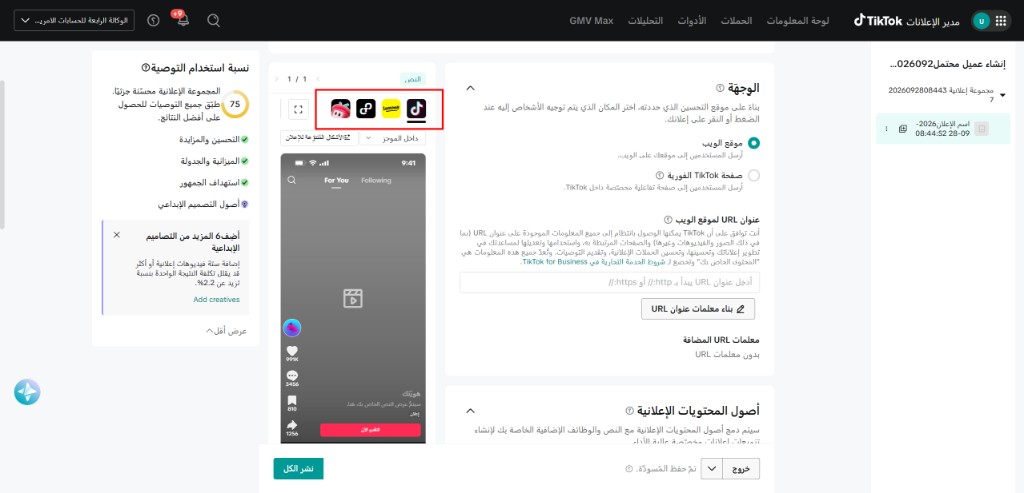
A normal TikTok ad
The red box is the placement row inside TikTok Ads Manager. Other networks sit beside TikTok and cannot be removed, so you cannot choose TikTok only.
A ChatLoora ad
The campaign is created inside ChatLoora and published on TikTok alone. Those extra platforms are not added, so the views stay on TikTok.
Connect the number that receives the ad chats.
Measure Contact and Lead from the campaign.
The ad is created for TikTok and nothing else.
Add balance, then manage the campaign from your phone.
How it works
Link a number, create a pixel, publish on TikTok only, and top up the ad account.
Sign up and choose a plan.
Connect the number that receives ad chats.
Track Contact and Lead for the campaign.
Set budget, audience, and the TikTok video.
The extra locked platforms are not included.
From $10 or 13,000 IQD, based on the account currency.
Pause, edit, and review without opening TikTok Ads.
Product tour
WhatsApp, pixels, TikTok-only campaigns, and ad-account top-ups from one site — including on your phone.
Customers
Create the campaign in ChatLoora, keep it on TikTok, and manage it from your phone.
“I create the campaign in ChatLoora and it stays on TikTok. I no longer fight the extra platforms that Ads Manager will not let me remove.”
Dr. Sara Al-Hassan
Clinic Director · Nour Medical Clinic
Medical Clinic
“I link the WhatsApp number, attach the pixel, and launch. The whole flow stays inside ChatLoora.”
Omar Khalil
Founder · Urban Cart
E-commerce
“I top up the ad account from the site and check results on my phone without opening TikTok Ads.”
Maya Farouk
Growth Lead · Pulse Agency
Marketing Agency
“Pausing a campaign or changing the budget takes a minute on the phone. I do not log into the ad account.”
Hassan Rami
Operations Manager · Table & Thyme
Restaurant
“The pixel and the WhatsApp number are connected before the campaign goes live, so the readings belong to that ad.”
Lina Qassem
Academic Coordinator · Bright Path Center
Training Center
“I manage more than one ad account from the same panel and top each one up in its own currency.”
Nour Jabari
Owner · Glow Aesthetics
Beauty Clinic
Results
0%
Ads created on TikTok only
0$
Minimum USD top-up
0
Minimum IQD top-up
0/7
Manage campaigns on mobile
Pricing
WhatsApp numbers, pixels, TikTok campaigns, and support. Higher plans add AI campaign review.
FAQ
Clear answers so you can decide with confidence.
ChatLoora lets you link WhatsApp numbers, create pixels, publish TikTok-only campaigns, and top up ad accounts from the website — including on your phone.
No. Your 3-day free trial requires no credit card and no payment upfront.
Create an account, send your registered email, and our team activates your workspace and sends training videos.
Yes. The panel is built for phones, so you can create and manage campaigns without opening your TikTok ad account.
In TikTok Ads Manager those placements are locked and cannot be removed. ChatLoora creates the ad on TikTok only, so they are not part of the campaign.
Yes. You link the ad account, create the campaign inside ChatLoora, and it is published on TikTok only.
Link WhatsApp numbers, create pixels, build TikTok campaigns, and top up ad accounts.
$10 for US dollar ad accounts and 13,000 IQD for Iraqi dinar accounts. The card payment is collected in IQD.
Yes. ChatLoora is multi-tenant with workspace isolation, permissions, and secure access controls.
Yes. Basic includes 1 number, Professional includes 3, and Business includes 10.
Basic includes 3, Professional includes 15, and Business has no pixel limit.
After you link WhatsApp and a pixel, you can create the TikTok campaign and top up the ad account from the same panel.
No. You create, pause, and review campaigns from ChatLoora on desktop or on your phone.
Choose Basic, Professional, or Business and continue without losing your training or connections.
Contact us on WhatsApp or email. Trial users also receive setup tutorials after activation.
Contact
Prefer a human conversation? Reach out and we’ll help you launch ChatLoora.